

- Rapid provisioning of macOS VMs in minutes instead of weeks
- Flexible deployments across any Apple silicon hardware, data center, or cloud vendor
- Repeatable macOS VMs that simplify workload virtualization and support hybrid environments
- Data security with centralized storage and VM management
- MDM integration supporting tools like JAMF and Kandji for desktop configuration
Prerequisites
- A macOS device with Apple silicon
- MacStadium VDI software installed
- A VM or container configured to run generated Ansible playbooks
- macOS 13 (Ventura), 14 (Sonoma), 15 (Sequoia), or Tahoe (26) Note: macOS Tahoe is supported by Engine and the Citrix VDA. The HP Anyware engine Cloud Access only supports access through macOS Sequoia.
- Firewall and network configured as outlined in: System Requirements | Citrix Virtual Delivery Agent for macOS
- An active Citrix DaaS or CVAD subscription
- Citrix Workspace app 2402 or later
- Citrix VDA for macOS downloaded to your macOS device from Citrix Downloads.
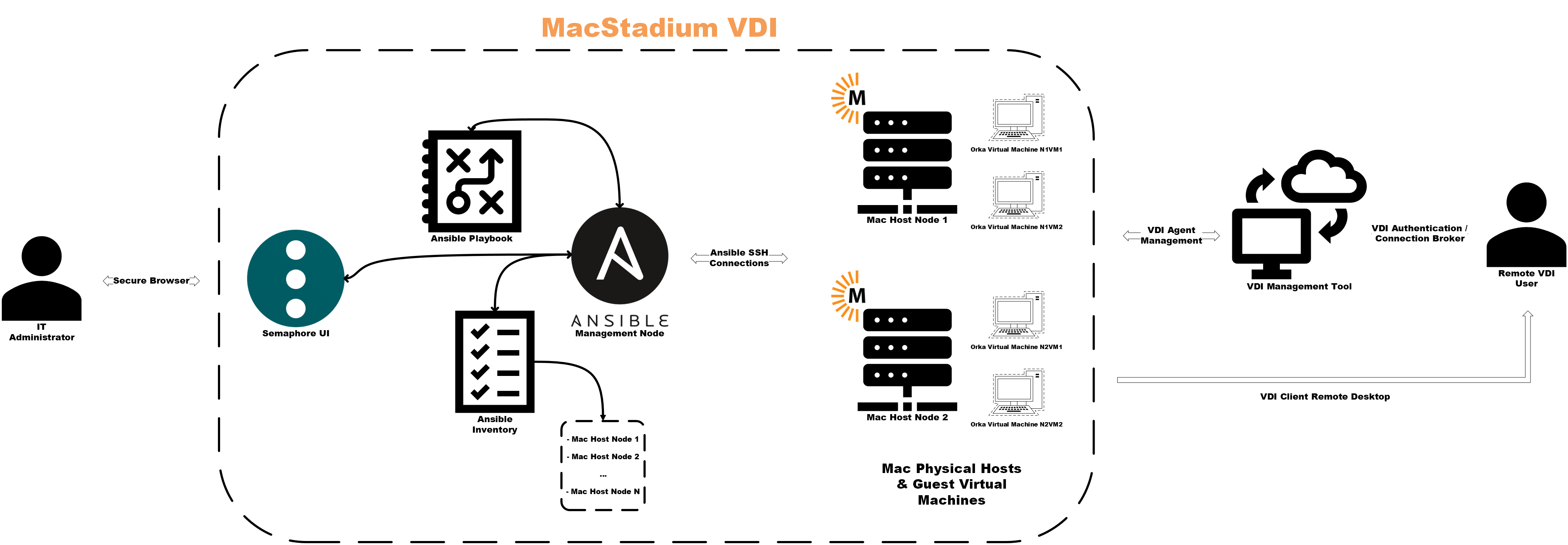
Architecture Diagram
Supported Hardware Platforms
MacStadium VDI supports any Apple silicon Mac that meets the following specifications: Minimum specifications per Orka host:- Apple silicon processor (any M-series chip)
- 8GB RAM
- 512GB storage
- 1GB Ethernet
- macOS 13 (Ventura) or later
- M2 Pro, M4 Pro, or higher
- 16GB+ RAM (32GB+ recommended for high-density deployments)
- 1TB+ storage
- 10GB Ethernet (recommended)
- macOS 14 (Sonoma), 15 (Sequoia), or 26 (Tahoe)
Capacity planning
The 2-VM-per-host ceiling is the constraint that shapes every MacStadium VDI deployment. Here’s how to size from it. Resource overhead per host:- Host OS and Orka Engine: ~2GB RAM, ~20GB disk
- Each Citrix VDA VM: 4-8GB RAM (8GB recommended for development workloads)
- Usable RAM per host after overhead: total RAM minus 2GB
This assumes one VM per concurrent user. For dedicated (persistent) deployments, size for your total user count, not just peak concurrency — each user holds a VM whether or not they’re logged in. For pooled (non-persistent) deployments, size for your expected peak concurrency, typically 60-80% of total users.
RAM guidance by deployment type:
Start conservative. MacStadium hosted deployments can add nodes without re-architecting — it’s easier to add hosts than to right-size VM RAM after users are in production.
Required Accounts and Credentials
- Orka Engine access
- Citrix Cloud/DaaS credentials (or alternative VDI tool credentials)
- Ansible control node access
- macOS device credentials